EasyRankly
Complete SEO. Nothing extra.
A free SEO plugin built with what WordPress already has. Your visitors download nothing: it only adds tags to the head of each page.


Fernhill Kitchenhttps://example.com › spring-menu
Our spring menu is here - Fernhill Kitchen
Six new dishes, all built around what the market has this month: wild asparagus, broad beans, the first strawberries. Book a table for lunch or dinner, Tuesday…
Not in Google: the page asks search engines not to index it.
<meta name='robots' content='max-image-preview:large' /><meta name='robots' content='max-image-preview:large, noindex' /><meta name="description" content="Six new dishes, all built around what the market has this month: wild asparagus, broad beans, the first strawberries. Book a table for lunch or dinner, Tuesday…" /><title>Our spring menu is here - Fernhill Kitchen</title><link rel="alternate" hreflang="en-US" href="https://example.com/spring-menu/" /><link rel="alternate" hreflang="fr-FR" href="https://example.com/fr/menu-de-printemps/" /><link rel="alternate" hreflang="x-default" href="https://example.com/spring-menu/" /><meta property="og:title" content="Our spring menu is here - Fernhill Kitchen" /><script type="application/ld+json"> Organization, WebSite, WebPage, Article, BreadcrumbList </script><link rel="canonical" href="https://example.com/spring-menu/" />Listed in /wp-sitemap.xmlLeft out of /wp-sitemap.xml
No hreflang: a page kept out of Google gets no language links, and its translation is not listed as an alternate.
Set it. See it printed.
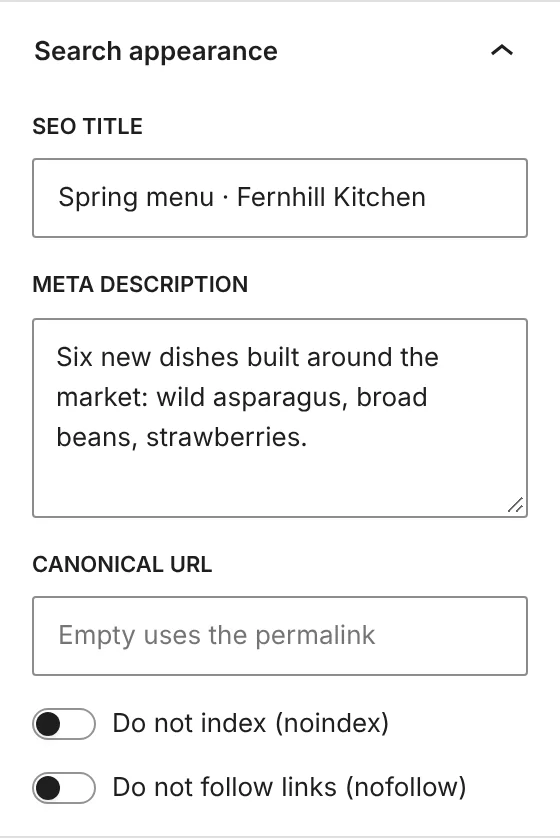
A real post and its Search appearance panel. Change a field and the head of the page changes with it.
Leave the title empty and the template writes it.
Every post type, archive and term has a title template. Type your own on any page and it wins, in Google and on social networks. Try it here.
No description? It takes the opening lines.
The excerpt, or the start of the text when there is none. Write one by hand when the first lines do not sell the page.
One switch keeps a page out of Google.
The robots tag gets noindex, the canonical goes, and the sitemap stops listing the page. Search results, empty archives and feeds are handled for you.
Link a translation and hreflang follows.
Each language has its own prefix, like /fr/. Linked pages point to each other, with x-default on the first language.
Old addresses keep working.
Exact addresses or regular expressions, with 301, 302, 307, 410 and 451. Change the address of a published page and its redirect is written for you. Pick a row.
Coming from Yoast SEO?
First, open EasyRankly › Import.
It finds what Yoast SEO or Rank Math saved, even after you deactivate them.
 >
>Then run it once.
Titles, descriptions, canonicals, noindex, social texts and redirects are copied. What you already set in EasyRankly is kept, so running it again changes nothing.
 >
>Now every post has its fields.
Open one and the Search appearance panel shows what came across. The old plugin keeps its data until you delete it.
>What does it add to the page?
What a visitor downloads from EasyRankly
- Scripts
- 0 B
- Stylesheets
- 0 B
- Fonts and images
- 0 B
- Requests to other servers
- 0
- Total
- 0 B
0 bytes
Of JavaScript and CSS that EasyRankly adds to the page your visitor loads, whatever you switch on. What EasyRankly prints is text in the head: its tags and one JSON-LD graph. No custom tables and no cron jobs either.
It looks like WordPress.
Plain admin screens under one menu, the block editor, the Breadcrumbs block and the sitemap WordPress already builds. Nothing to learn twice, and nothing left behind when you delete it.
- Multilingual. Languages with their own prefix, linked translations and a switcher block.
- Custom code. HTML and PHP snippets with a syntax check, revisions and a safe mode.
- WooCommerce and ACF. SEO for the shop, and custom fields in title templates.

Questions
Can I keep Yoast SEO or Rank Math active too?
No. Two SEO plugins print the same tags twice: title, description, canonical and structured data. Deactivate the old one, then EasyRankly › Import copies its SEO fields and redirects.
Is it really free?
Yes. It is open source under GPLv2 or later, from the WordPress.org directory. No account, no licence key, no ads in your admin.
Does it send data anywhere?
No. It connects to no external service, does not track visitors and stores nothing about them. What it saves is your settings and SEO fields, in your WordPress database.
Do classic themes work?
SEO, sitemap, redirects and custom code work with every theme. The breadcrumb and the languages need a block theme, because they rely on the Breadcrumbs block and template parts.
Does it work on multisite?
Yes. Each site has its own settings, redirects, snippets and languages. Deleting the plugin removes its data from every site of the network.
What if a PHP snippet breaks the site?
Code is checked before it is saved, and a fatal error switches the snippet off. If you are locked out anyway, add define( 'EASYRANKLY_SAFE_MODE', true ); to wp-config.php and no snippet runs.
More answers in the documentation.
Complete SEO, without the weight.
Free and open source. Install it, bring your old SEO fields along, and get back to writing.